

થોડા ફેરફારો અને થોડા સુધારા. અહીં ફેરફારો છે:
- We removed the Firefox ‘recommended extensions‘ from the Addons page, since Firefox will often recommend trade-based extensions. For current users: go to a new Firefox tab and write ‘વિશે:રૂપરેખા‘. Press enter. Then click ‘accept the risks and continue‘. In the search box search for ‘extensions.htmlaboutaddons.recommendations.enabled‘ and disable it by toggling the disable button like you see bellow.
.
- We removed the Firefox ‘recommended extensions‘ from the Addons page, since Firefox will often recommend trade-based extensions. For current users: go to a new Firefox tab and write ‘વિશે:રૂપરેખા‘. Press enter. Then click ‘accept the risks and continue‘. In the search box search for ‘extensions.htmlaboutaddons.recommendations.enabled‘ and disable it by toggling the disable button like you see bellow.
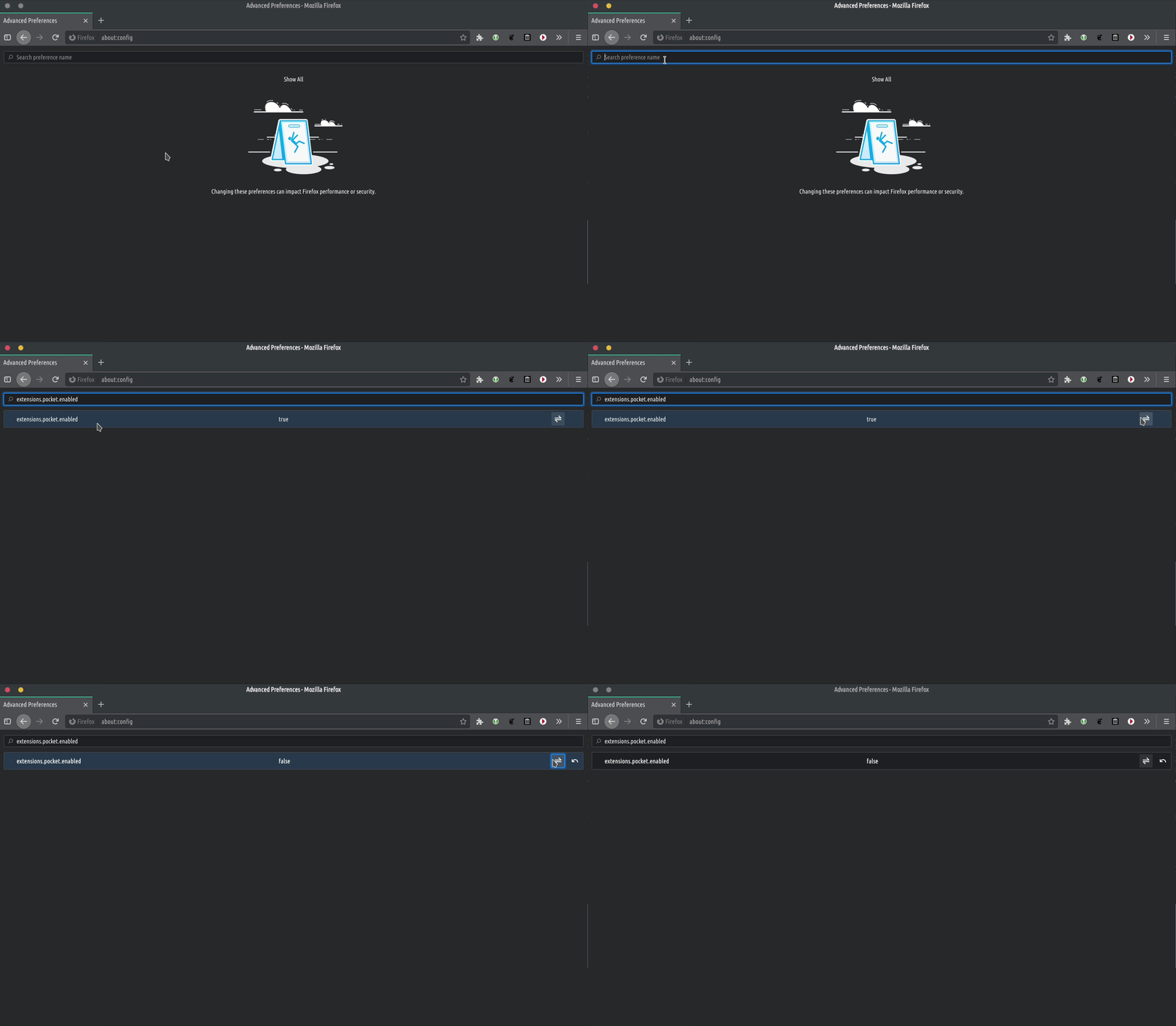
.- We replaced some screenshots for the TROMjaro Installer to reflect our latest changes to TROMjaro.
- We removed the extension “Search by Image” Firefox તરફથી, કારણ કે તે Google, Bing અને અન્ય વેપાર-આધારિત સેવાઓનો ઉપયોગ કરી રહ્યો હતો. હા, Firefoxના અમારા સંસ્કરણનો ઉપયોગ કરીને, વપરાશકર્તાઓને તેમના ડેટા/આ સંસ્થાઓ પર ધ્યાન આપવાથી સુરક્ષિત કરવામાં આવ્યા હોત, પરંતુ અમારા માટે વેપાર-મુક્ત વિકલ્પ શોધવાનું વધુ સારું રહેશે. આ એક્સ્ટેંશન તમને ઇમેજ માટે રિવર્સ-સર્ચ કરવાની મંજૂરી આપે છે, જે ઉપયોગી છે, પરંતુ કદાચ તે જરૂરી નથી, અમે તેને કોઈ પણ સંજોગોમાં મફતમાં વેપાર કરવા માટે ટૂંક સમયમાં ઉમેરીશું. TROMjaro.
- અમે મહાન qTox મેસેન્જર માટે ડિફોલ્ટ રૂપે એક ડાર્ક થીમ સક્ષમ કરી છે જેની સાથે TROMjaro પૂર્વ-ઇન્સ્ટોલ કરેલું છે. થીમ બાકીના OS સાથે મેળ ખાય છે.
- છેલ્લે, અમે અમારી APPS લાઇબ્રેરીમાંથી સીધા જ ફ્લેટપેક્સના ઇન્સ્ટોલેશન માટે સક્ષમ કર્યું. આ ખરેખર સરસ છે કારણ કે તે અમને ભલામણ કરવા માટે વધુ એપ્લિકેશનો ખોલે છે. હવે વપરાશકર્તાઓ ખૂબ જ સરળતાથી AUR ઇન્સ્ટોલ કરી શકે છે, રિપોઝીટરીઝમાંથી અથવા ફ્લેટપેક્સ સીધા અમારાથી APPS પુસ્તકાલય અને તમે તફાવત કહી શકતા નથી કારણ કે પ્રક્રિયા બધી સમાન અને ખૂબ સરળ છે. અલબત્ત, વપરાશકર્તાઓ TROMjaro માં AppImages પણ ઇન્સ્ટોલ કરી શકે છે. તેથી, રિપોઝીટરીઝ, AUR, Flatpaks અને AppImages સાથે, અમારી APPS લાઇબ્રેરીમાંથી TROMjaro પર કોઈપણ Linux એપ્લિકેશન ઇન્સ્ટોલ કરી શકાય છે. વર્તમાન વપરાશકર્તાઓએ 'ઇન્સ્ટોલ કરવું આવશ્યક છેવેબ-ઇન્સ્ટોલર-યુઆરએલ-હેન્ડલર' તેને સક્ષમ કરવા માટે. તેને સક્ષમ કર્યા પછી, તેની સાથે પરીક્ષણ કરો આ VLC પેકેજ ફાયરફોક્સ તમને ' સાથે ખોલવા માટે કહેશેવેબ ઇન્સ્ટોલર‘. You can select to make it open with it by default, then click ‘remember my choice‘. It should work.
That’s all for now. We are trying to keep TROMjaro the same. Simple. No nonsense. Trade-Free.